
If you want to get a real handle on customer attrition, you have to stop just reacting to cancellation emails. The game is won by getting ahead of the problem—spotting the subtle warning signs in product usage and subscription data before a customer even thinks about leaving. This gives your team a fighting chance to step in with the right message, reinforce the value you provide, and fix whatever's broken.
Confronting the Real Cost of Customer Attrition
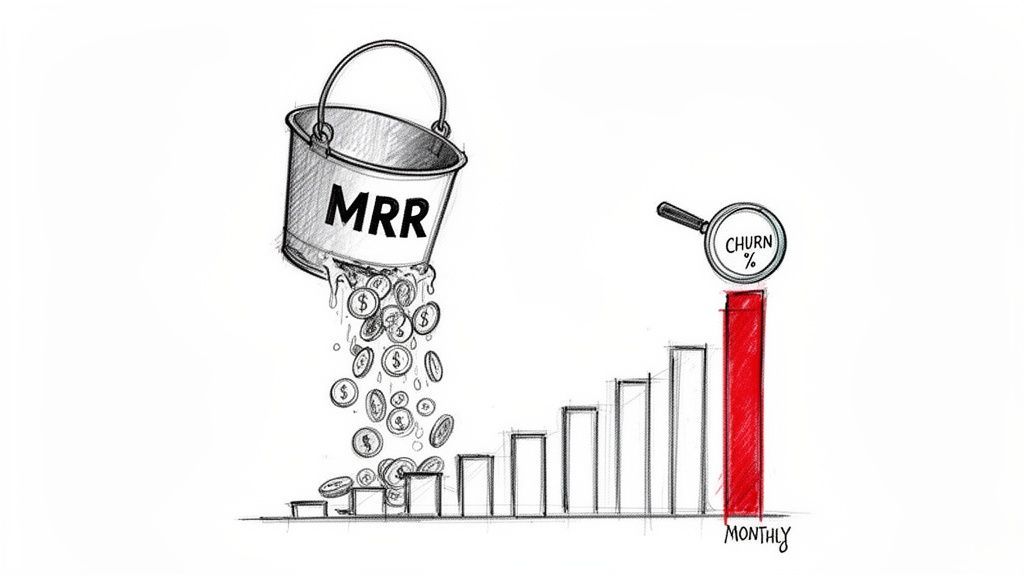
Customer attrition is far more than a number on your KPI dashboard; it’s the silent killer of growth for SaaS companies. We all love to celebrate new monthly recurring revenue (MRR), but churn is constantly eating away at that progress from the bottom. The financial hit is easy to underestimate because the damage compounds, turning what seems like a small monthly leak into a massive revenue drain by year's end.
Think about it this way: a seemingly manageable monthly churn rate of 5% balloons into a shocking 46% annual loss of your customer base. Nearly half your users are gone in just 12 months. If that rate climbs to 10% monthly, you're losing over 70% of your customers annually. At that point, you're not growing; you're just desperately trying to rebuild your entire customer list every single year. You can see the full breakdown of these numbers in the latest State of Retention 2025 report.
"Acquiring a new customer can cost five times more than retaining an existing one. If your focus is solely on acquisition while ignoring retention, you are effectively trying to fill a leaky bucket—an expensive and unsustainable growth strategy."
This constant treadmill of replacing lost customers burns through cash and energy that should be going into making your product better and scaling the business. Building a proactive plan to reduce customer attrition isn't just about playing defense; it’s one of the smartest investments you can make in sustainable growth.
Understanding Voluntary vs Involuntary Churn Drivers
To fight churn effectively, you first need to know what you're up against. Attrition comes in two main flavors: voluntary and involuntary. Each one is driven by completely different issues and, naturally, requires a different playbook to solve.
The table below breaks down the common drivers for each type, giving you a clearer picture of what you can control.
| Churn Type | Common Drivers | Example Prevention Tactic |
|---|---|---|
| Voluntary Churn | Perceived lack of value or ROI | Proactive health checks and value-reinforcing email campaigns |
| Poor customer support experience | Improve support response times and offer multi-channel support | |
| Competitor offers a better feature set or price | Conduct regular competitive analysis and update product roadmap | |
| Onboarding experience was confusing or incomplete | Implement a targeted onboarding sequence with clear milestones | |
| Involuntary Churn | Expired or lost credit card | Automated dunning emails requesting updated payment info |
| Insufficient funds in the customer's account | Smart retry logic that attempts charges at optimal times | |
| Bank declines or fraud alerts (common with Stripe) | Pre-dunning notifications before the renewal date |
A shocking amount of revenue simply walks out the door due to preventable payment failures. By separating these two churn types, you can stop treating all churn the same and start deploying targeted fixes—whether that’s addressing a core product-value gap or just fixing a simple billing hiccup.
Identifying the Root Causes
Before you can convince a customer to stay, you have to understand why they’re thinking of leaving in the first place. The good news is that while every business is different, the reasons for churn usually fall into a few predictable buckets. When you pinpoint these drivers, you can move past generic, one-size-fits-all fixes and create solutions that actually work.
For example, do you see a lot of customers churning right after onboarding? That's a huge red flag that you're failing to show them the "aha!" moment early on. On the other hand, if tenured, long-time users are suddenly leaving, it might be because a competitor just launched a killer feature or their own business needs have changed.
Each scenario needs a totally different response. By digging into the "why," you turn every lost customer into a valuable lesson that makes your retention strategy smarter.
Shifting from Reactive Fixes to Predictive Prevention
Most SaaS teams are stuck in a reactive loop. A customer clicks "cancel," an alert goes off, and the team scrambles to salvage the account. While a solid offboarding flow can sometimes pull a customer back from the brink, you're already playing defense. The damage is done.
The best companies flip this entire model on its head. They move from reactive damage control to proactive, predictive prevention. The real goal isn't just to win back canceling customers; it's to spot the warning signs and step in long before they even think about leaving.
This requires a fundamental shift in how you see your data. It's about blending two critical streams of information: your product usage analytics and your Stripe subscription signals. Put them together, and you get a clear, actionable picture of customer health.
Spotting the Subtle Clues of Churn
Customers almost never decide to leave overnight. It’s usually a slow fade—a series of small behavioral changes that signal growing disengagement. Your job is to catch these subtle shifts while you still have time to make a difference.
These leading indicators of churn are often hiding in plain sight:
- Decreased Feature Adoption: A team that once lived inside your core features is now barely logging in.
- Fewer Team Invites: That power user who added new colleagues every month suddenly goes quiet.
- Changes in Session Length: Average session times are dropping, meaning users are getting less value each time they visit.
- Support Ticket Patterns: A sudden drop in support tickets from a previously active account can be a bad sign—it might mean they’ve given up trying to solve their problems.
These are the whispers of churn. If you ignore them, the only thing you'll hear later is the loud shout of a cancellation email. Companies that get good at using predictive analytics to monitor these behaviors can often reduce churn by up to 15%. They're not doing anything magical; they're just acting on the early warnings.
For a deeper look, our guide on predictive analytics for customer retention breaks down how these models are built.
Introducing the Dynamic Customer Health Score
So, how do you take all these different signals and turn them into something your team can actually use? The answer is a dynamic customer health score. This isn't some static number you set once and forget. It's a living metric that rises and falls with real-time customer behavior.
Think of it like a credit score for customer loyalty. It pulls together dozens of data points into a single, easy-to-understand rating. A high score means the customer is healthy, engaged, and on track to renew. A falling score is your alarm bell, flagging that account for immediate attention.
By quantifying customer health, you move from guesswork to a data-driven prioritization system. Instead of treating all customers the same, your team can focus its limited time and energy on the accounts that need it most, dramatically improving your chances of saving them.
A truly useful health score needs to pull from several key areas:
- Product Engagement: How often are they logging in? Which key features are they using (or not using)?
- Subscription Data: Are they on a monthly or annual plan? Have they had recent payment failures in Stripe?
- Support Interactions: What’s the tone of their recent support tickets? How quickly were their issues resolved?
- Account Growth: Are they adding users, or have they stayed stagnant for months? Are they upgrading?
This composite score becomes the central nervous system for your entire retention strategy. It tells your Customer Success team exactly who to call, what to talk about, and when to reach out. This data-driven approach lets you flag at-risk accounts weeks in advance, opening up a crucial window to intervene. You can re-engage them with a targeted email campaign, offer a personalized training session, or just check in with a proactive call.
This is how you stop fighting fires and start preventing them from ever starting in the first place.
How to Build Your Customer Health Dashboard
Predictive insights are fantastic, but they're useless if your team can't easily see them, understand them, and act on them. This is where a well-designed customer health dashboard comes in. It's not about building something overly complex; it's about creating a single source of truth that shows you who's at risk, why they're struggling, and what to do next.
A great dashboard serves everyone, from a founder tracking the health of their MRR to a customer success manager deciding who to call first thing in the morning. The goal is to get away from spreadsheets and gut feelings and move toward a visual, actionable command center that makes it simple to reduce customer attrition without needing a data science degree.
Core Components of an Effective Dashboard
To be genuinely useful, your dashboard needs to do more than just list at-risk accounts. It has to provide context and clarity at a glance. Think of it as telling a story about your customer base, highlighting both your wins and the urgent risks that need your immediate attention.
Here are the essential pieces you'll want to include:
- Real-Time MRR Health: A clear view of your total MRR, broken down by health status (think categories like Healthy, At-Risk, and Poor). This instantly shows you how much revenue is on the line.
- Prioritized At-Risk Accounts: A dynamic list of customers with falling health scores, sorted so the highest-value, highest-risk accounts are right at the top.
- Key Health Indicators: The specific data points that explain why an account is flagged as at-risk. This is where you track the signals feeding into your overall score.
- Retention Campaign Performance: Metrics that show if your playbooks are actually working—things like MRR saved from dunning campaigns or re-engagement rates from outreach emails.
"A dashboard isn't just for reporting; it's for decision-making. If it doesn't immediately tell your team where to focus their energy for the day, it’s just a collection of charts."
This kind of visual hierarchy helps your team quickly grasp the big picture—how much revenue is in danger—before drilling down into the specific accounts and actions needed to protect it.
Essential Metrics to Track for Health Scoring
The real magic of a customer health score comes from the data you feed it. Just tracking logins won't cut it. You need to blend product usage signals with subscription data directly from Stripe to get an accurate picture of what's going on.
Here are a few high-impact data points we always recommend tracking:
- Time Since Last Key Action: Forget simple logins. How long has it been since a user completed a core, value-driving action in your app? That’s a far more telling metric.
- Feature Adoption Velocity: How quickly are new users adopting the features you know correlate with long-term retention? A slow start is a huge red flag.
- Subscription Tenure: New customers are almost always the most vulnerable. SaaS founders know the benchmarks well; data shows software companies retain just 39% of users after one month and only 30% after three. This early retention cliff is brutal for Stripe-based models where early losses compound. For more details on these benchmarks, you can explore the latest customer retention rates.
- Support Ticket Volume & Sentiment: Has an account suddenly started flooding you with support tickets? Or, just as worrying, have they gone completely silent? Both extremes can signal trouble.
- Failed Payment History: A history of failed payments in Stripe, even if they were eventually recovered, can be a sign of financial instability or that your product is low on their priority list.
This infographic breaks down the journey from a basic, reactive approach to a much more sophisticated, predictive one.
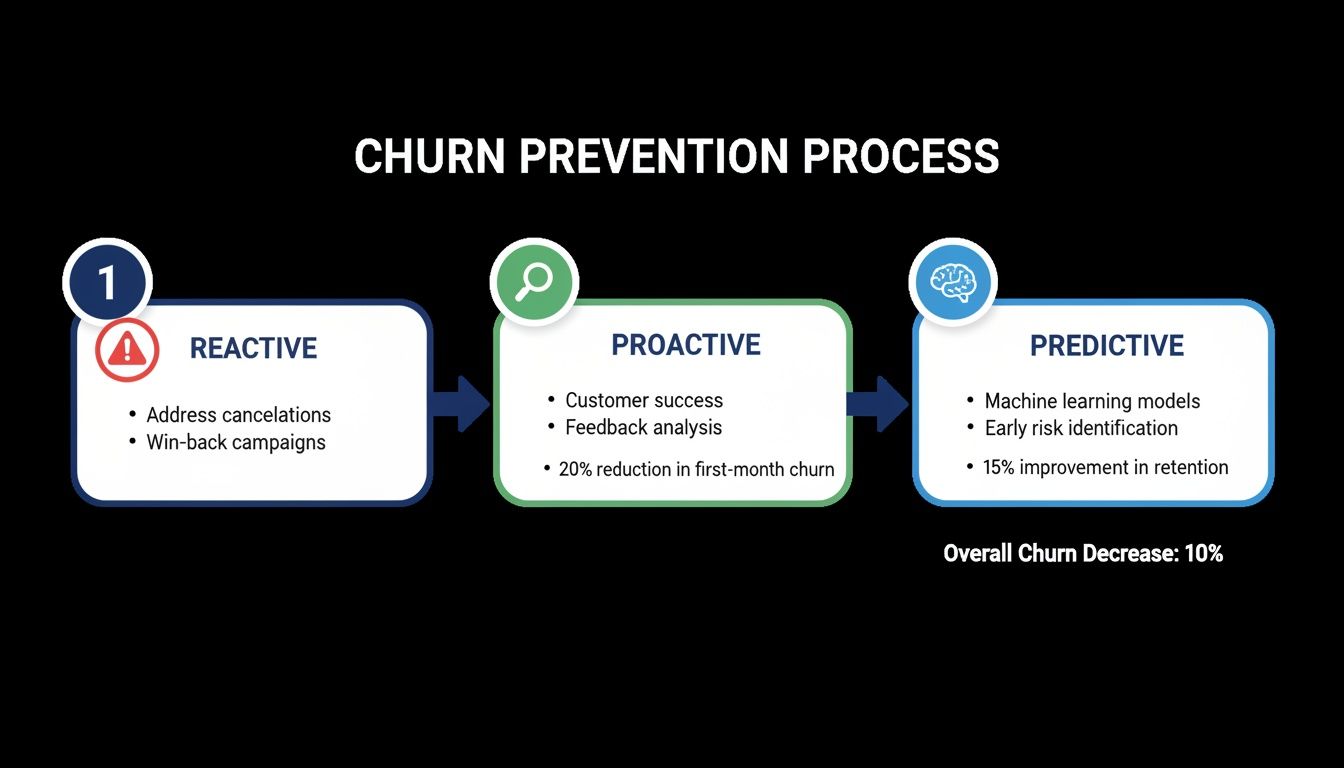
As you move along this spectrum, your team can step in earlier and more effectively, saving accounts before they even start thinking about leaving. A great dashboard is what makes this possible, flagging accounts while they're still in the proactive and predictive stages.
Putting Actionable Retention Playbooks to Work
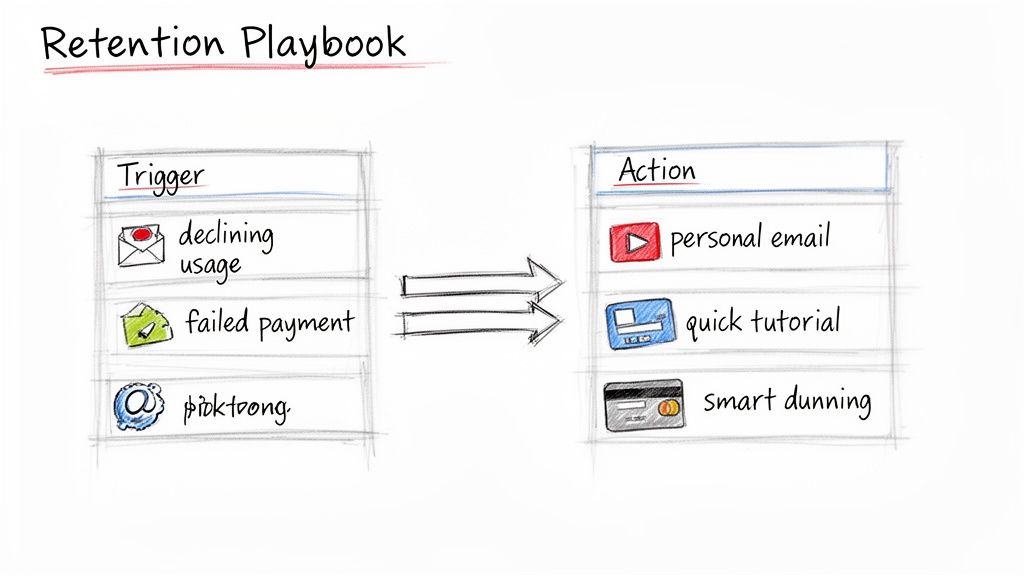
Knowing a customer is at risk of churning is only half the battle. The real work starts with the what—what are you going to do about it? This is exactly where retention playbooks come into play. Think of them as your predefined responses, both automated and manual, designed to intervene at precisely the right moment with the right message.
Instead of scrambling every time a customer's health score takes a nosedive, playbooks give your team a clear, repeatable set of actions tied to specific churn triggers. This structured approach moves you from reactive firefighting to a proactive system that actually saves accounts and lets you reduce customer attrition at scale.
The secret is tailoring each playbook to solve a specific problem. A customer struggling with a new feature needs a completely different kind of support than someone whose credit card just expired. One-size-fits-all retention tactics almost always fall flat because they miss the root cause of the disengagement.
Playbook for Declining Product Engagement
One of the loudest warning bells is a slow, steady drop in product usage. You see a customer who once logged in daily now only stopping by weekly, and their interactions with key features have cratered. This is a classic sign that they're losing sight of the value, and you need to act fast to reignite that initial "aha!" moment.
For this scenario, your playbook should be all about re-engagement through education and value reinforcement. The goal isn't to be pushy; it's to gently guide them back to the features that solve their core problems.
An effective playbook for sagging engagement might look something like this:
- Trigger an Automated Email: When a user's activity drops below a set threshold for 14 days, automatically send a personalized email. Highlight an underused feature that’s relevant to their role. A subject line like, "A quick tip for [Feature Name] that can save you an hour this week," works wonders.
- Offer Proactive In-App Guidance: The next time they log in, use subtle in-app tooltips or a quick interactive tour to show off a new update or a powerful workflow they haven't touched yet.
- Personal Outreach for High-Value Accounts: For your high-MRR customers, a dip in engagement should automatically create a task for their Customer Success Manager. A simple, low-pressure email—"Hey [Name], just checking in. Anything we can do to help you get more from the platform?"—can open up a crucial conversation.
This hands-on approach is critical. Research shows that 68% of users are more loyal to businesses that provide ongoing education. This playbook turns a churn signal into a chance to teach and add value. To explore this further, our guide on creating a better customer onboarding for SaaS offers deep insights into making education a continuous process.
A great retention playbook isn't about begging a customer to stay. It's about proactively reminding them why they chose you in the first place by helping them solve their problems more effectively.
Playbook for Involuntary Churn from Failed Payments
A huge chunk of churn isn't voluntary at all—it's accidental. Failed payments from expired cards, insufficient funds, or fussy bank declines are a silent MRR killer, especially for businesses using Stripe. The good news? This is one of the easiest leaks to plug with a smart dunning playbook.
The objective here is simple: make it frictionless for the customer to update their billing info without ever interrupting their service.
Here’s a proven dunning sequence that just works:
- Immediate Notification: The instant a Stripe payment fails, fire off an automated email. Keep the tone friendly and direct, with a crystal-clear link to their billing page.
- Smart Retries: Don't just hammer the card every day. Use a smart retry schedule that attempts the charge at different times of the day, which can increase the odds of success.
- In-App Banners: For users who are still active, display a non-intrusive banner inside the app. Something like, "There's an issue with your payment. Please update your billing info to maintain access."
- Escalation Before Cancellation: After a few failed attempts over a week, send a final notice that their account is scheduled for suspension. This little bit of urgency is often the nudge they need to take action.
This systematic process can recover a surprising amount of revenue. Some companies find that smart dunning campaigns can reduce overall churn by up to 9%. It’s often the lowest-hanging fruit in your entire retention strategy.
The table below offers a few more examples to get you started on building your own library of playbooks.
Retention Playbook Examples for At-Risk Segments
Here are a few actionable playbooks designed for specific at-risk customer segments, outlining the trigger and the corresponding action to take.
| At-Risk Segment | Primary Trigger | Recommended Playbook Action |
|---|---|---|
| New Users (First 30 Days) | Low feature adoption or incomplete onboarding checklist. | Trigger a personalized onboarding email series with short video tutorials for key features. |
| Power Users Gone Quiet | A sudden drop in login frequency or key action usage. | Assign a manual task for a CSM to send a personal check-in email and offer a 15-minute success review call. |
| Price-Sensitive Customers | Visiting the pricing or cancellation page frequently. | Trigger an automated offer for a discount on an annual plan to provide more value and secure a longer commitment. |
| Customers with Failed Payments | Stripe invoice.payment_failed webhook event. |
Initiate a multi-step dunning sequence with emails, in-app notifications, and smart retry logic. |
Use these as a starting point. The best playbooks are the ones you refine over time based on what truly works for your customers and your business.
Operationalizing Your Churn Prevention Strategy
A brilliant churn prevention strategy is useless if it’s not actually used. Let's be honest, a dashboard nobody checks or a playbook gathering digital dust won't save a single customer. To make a real dent in your attrition numbers, these efforts have to be woven into the daily fabric of your operations.
This isn't just a job for your customer success team. It’s a company-wide mission. The cost of getting this wrong is staggering—U.S. businesses lose a collective $136.8 billion every year from customers who walk away after just a few bad experiences. You can dig deeper into the full insights into customer retention statistics to see just how big the problem is.
When everyone understands their part, your data stops being a passive report and becomes an active, revenue-saving tool.
Defining Team Roles and Responsibilities
To make churn prevention a reflex, you need crystal-clear ownership. Ambiguity is the enemy of action. Every team has a unique perspective and can contribute in powerful ways, so let's define those roles right now.
The Founder/CEO: Your job is to champion retention from the top. You're the one monitoring the big picture: overall MRR health, the percentage of revenue at risk, and whether your retention efforts are actually paying off. You keep the entire company laser-focused on net revenue retention as a primary growth driver.
Customer Success Team: These are your boots on the ground. The CS team lives and breathes the retention playbooks. They’re the ones watching the at-risk dashboard, reaching out to high-value accounts, and funneling customer feedback to the product team to close the loop.
Product Team: Your product roadmap is one of your most powerful retention weapons. The product team should be using churn data and CS feedback to hunt down friction points and fill feature gaps that push customers away. They own the long-term fix by building a product that’s simply too valuable to leave.
By assigning clear roles, you create a system of accountability. Suddenly, saving accounts isn't just a "customer success problem." The entire organization is aligned on creating an experience that makes customers want to stay.
An Implementation Checklist for Stripe Businesses
Getting this off the ground doesn't have to be a six-month ordeal. If your SaaS runs on Stripe, the process is surprisingly straightforward. Modern tools are built for lean teams that need to see results, fast.
And if you're looking to arm your team with the right tech, exploring different 11 AI Customer Support Tools can give you a serious edge in making your operations more efficient.
Here's a quick checklist to get your operational engine humming:
Connect Your Stripe Account: First things first, link your Stripe data. You'll want to find a platform that uses a read-only key. This is a critical security step—it means the tool can see subscription metadata (like plan status and renewal dates) but can't touch sensitive PII or financial info.
Install the Analytics Snippet: A small piece of JavaScript on your site is all it takes to start tracking product usage signals. This is the magic that connects what a customer does in your app with their subscription status in Stripe, which is the foundation for any predictive health score.
Review Your Initial Health Scores: Once connected, the system will crunch your historical data and give you its first batch of health scores. Take a good look at the accounts it flags as "At-Risk" or "Poor." Does it match your team's gut feeling? This initial check is crucial for building trust in the data.
Activate Your First Automated Playbook: Don't try to boil the ocean. Start with the easiest win: involuntary churn. Fire up a smart dunning playbook to automatically handle failed payments. Honestly, this one move can often pay for the entire system by recovering MRR you would have otherwise lost in the very first month.
Set Up a Daily Check-in Routine: Make the customer health dashboard part of your team's morning coffee. A quick, five-minute scan is all a CS manager needs to spot the priority accounts that require attention today.
Follow these steps, and retention stops being a special project. It becomes a core business process, just like sales or marketing. This operational rhythm is what turns good intentions into measurable, sustained reductions in customer churn.
Answering Your Questions About Reducing Customer Attrition
Even with a perfect playbook, you're bound to have questions when you start getting serious about customer attrition. It’s a big project that touches everything from your team’s daily workflow to data security. Let's dig into some of the most common questions I hear from SaaS founders as they get started.
How Long Does It Take to See Results?
This is always the first question, and for good reason: When will our churn rate actually go down? The good news is you don't have to wait a quarter to see an impact. With the right tools, you can get moving fast.
A lightweight platform that plugs directly into your Stripe data can start generating surprisingly accurate predictions—often with 85%+ accuracy—within just a couple of days. It’s not magic; it’s just analyzing the historical subscription and product usage data you already have.
You’ll start seeing real, tangible results, like saved MRR, within the first few weeks. That’s when your team begins acting on the prioritized list of at-risk accounts and launches its first automated retention campaigns. Think of it as shrinking the time between spotting a problem and actually solving it.
Will a Churn Prevention Tool Access Sensitive Data?
Data security should be at the top of everyone's list, so this is an excellent and important question. Any reputable churn prevention platform is built with a "privacy-first" mindset. The gold standard you should look for is a tool that uses a read-only Stripe key.
This is a critical detail. A read-only key lets the tool see subscription metadata—things like plan status, renewal dates, and trial info—but it cannot process charges, see full credit card numbers, or access sensitive customer PII.
The analysis should always focus on non-sensitive signals. The system is looking at subscription changes, plan types, and product usage patterns, not your customers' financial details. Always verify a platform's data privacy and security policies before connecting any service.
Can Our Small Team Realistically Implement This?
Yes, you absolutely can. In fact, modern churn prevention tools are built for lean teams that don't have a data scientist on staff. The whole point is to automate the complex number-crunching so your team can focus on what they do best—talking to customers and solving problems.
You'll want a solution that provides things like:
- One-click retention campaigns: Pre-built playbooks based on best practices that you can launch in minutes.
- A simple, prioritized dashboard: A clear list of who to contact and why, so there's no guesswork.
- No-code setup: Installation should take minutes, not weeks of precious engineering time.
This approach transforms what used to be a heavy data science project into a simple daily workflow. A solo founder or a small CS team can manage it effectively in just a few minutes a day, making it a huge force multiplier.
What Is the Most Common Mistake to Avoid?
The single biggest mistake I see companies make is waiting too long to act. Too many teams only jump into action after a customer has already hit the "cancel" button or sent a frustrated support ticket. By that point, they've likely made up their mind, and you're left trying to win them back from a losing position.
Being proactive is a game-changer. It's about spotting the subtle, early warning signs before they escalate into a full-blown cancellation. For a deeper look at this, you can explore some proven strategies to boost retention and reduce churn that really dive into this proactive mindset.
Another common pitfall is obsessing over voluntary churn while completely ignoring involuntary churn from failed payments. A huge chunk of that is recoverable with smart dunning. It's often the lowest-hanging fruit for an immediate MRR boost.
Ready to stop reacting to churn and start preventing it? LowChurn is an AI-powered platform built for Stripe businesses that predicts which customers will cancel and gives you the tools to save them. Get started for free and see your at-risk revenue in minutes.